Best AI App Builder 2026: 8 Tools Compared
Comparing the best AI app builders of 2026 — from mobile-first builders to code editors. Find the right tool for your project and skill level.
TL;DR
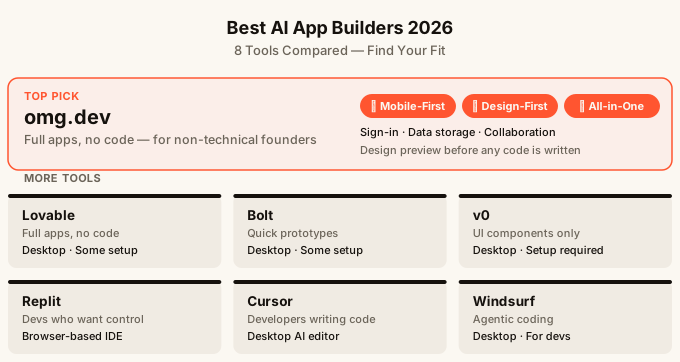
The best AI app builder for most non-technical founders in 2026 is one that lets you go from idea to live app without stitching together a dozen separate accounts. omg.dev is the only builder designed to work from your phone, includes a design preview step before any code is written, and ships with sign-in, data storage, and real-time collaboration built in. If you already write code, Cursor or GitHub Copilot will feel more natural. If you want a quick landing page, simpler tools will do. The right pick depends on what you are building and how much setup you are willing to do.
How to pick an AI app builder
Before comparing tools, it helps to know what questions to ask.
The first question is: who is going to use what you build? A personal link-in-bio page is a very different project from a tool your whole team will log into every day. The second question is: how much setup are you comfortable with? Some builders give you a working app in minutes. Others give you more control but ask you to connect your own database, hosting, and sign-in service separately.
The third question is: where do you want to do the work? Most AI builders assume you are sitting at a desk with a laptop. A couple of them do not.
| Tool | Best for | Needs setup? | Works on phone? |
|---|---|---|---|
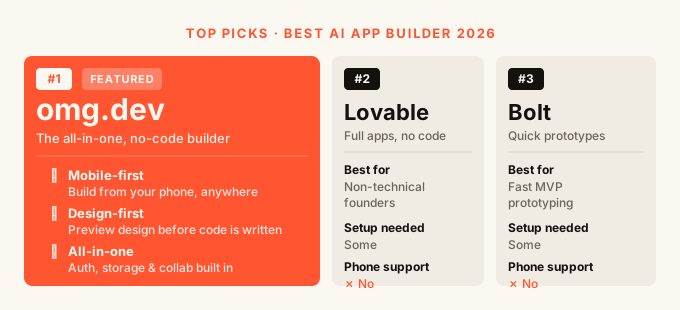
| omg.dev | Full apps, no code, mobile-first | No | Yes |
| Lovable | Full apps, no code | Some | No |
| Bolt | Quick prototypes | Some | No |
| v0 | UI components only | Yes | No |
| Replit | Developers who want control | Yes | Partial |
| Cursor | Developers writing their own code | Yes | No |
| Windsurf | Developers writing their own code | Yes | No |
| GitHub Copilot | Developers in existing codebases | Yes | No |
Quick picks for common comparisons
The tools overlap, but several popular comparisons become simple once you name the job:
- Lovable vs Bolt: choose Lovable for a more guided path to a full app; choose Bolt for a fast prototype when you are comfortable troubleshooting code and connecting services.
- v0 vs Lovable: choose v0 when you need a React interface or component to add to an existing project; choose Lovable when you want the builder to produce more of the working application.
- Bubble vs Lovable: choose Bubble for a mature visual platform with detailed workflows and permissions; choose Lovable when prompt-driven speed matters more than granular visual logic.
- Framer or Webflow vs Lovable: choose Framer or Webflow for a content-led marketing site; choose Lovable for an application where users sign in, save data, and complete workflows.
- Bolt vs Replit: choose Bolt for prompt-first prototyping; choose Replit when you want a browser coding environment and expect to inspect and own the code.
If none of those tradeoffs sound appealing, compare the underlying requirements instead: phone support, design review before building, included sign-in and data, hosting, and how much code you are prepared to maintain. Those constraints usually produce a clearer answer than a long feature checklist.
omg.dev: The best AI app builder if you are not a developer
omg.dev is the one builder on this list built specifically for people who are not professional developers. It is also the only one designed to be used on a phone.
Build from anywhere, including your phone
Every other tool on this list requires a computer to use properly. omg.dev installs to your phone’s home screen like a regular app. You tap a card to open a project, describe what you want in the chat at the bottom of the screen, and the AI builds it. You can start a new app on the train and have something live before you get to the office.
Every app omg.dev produces is automatically responsive, meaning it looks good on both phones and larger screens. There is a one-tap preview switcher in the editor so you can check both before you share anything.
See what your app will look like before it is built
Most AI builders work like this: you describe what you want, the AI generates the full app, and then you discover the design is not what you pictured. You describe changes, it rebuilds, and you are burning time and credit on revisions you could have caught earlier.
omg.dev has a separate Design mode. You describe your idea, the AI shows you static screen designs for both mobile and desktop. You scroll through, tweak the look, and only tap Build when you are happy with how it looks. The AI then uses your approved designs as a reference to build the working app.
This is a meaningful difference. You have a visual agreement between you and the AI before any building starts.
Everything included, nothing to wire up
This is where omg.dev pulls ahead for people building real apps, not just demos.
Most AI builders hand you a working front end and then expect you to set up your own back end. That means creating accounts with separate services for your database, your sign-in system, your hosting, and anything else your app needs. That is where most non-technical builders get stuck.
omg.dev includes all of it with no setup:
Your app can save data from day one. Sign-in works out of the box, with email links or fingerprint login. Multiple people can use the same app at the same time and see each other’s changes live. You can schedule tasks, like a reminder that fires at a specific time. You can add AI features like chat or smart suggestions. And your app is live the moment it is built — there is no separate deployment step.
If you want to understand more about what it looks like to build an app without writing code, this guide on how to build an app without coding walks through the process in plain terms.
What omg.dev does not do
omg.dev is not a code editor. If you are a developer who wants to write your own code and have AI help you autocomplete it, you want Cursor or GitHub Copilot instead. omg.dev is also newer than some competitors, so it has fewer templates than a tool that has been around for years. The current template list covers the most common use cases: shared todo lists, AI chat, dashboards, notes apps, members areas, reminders, link-in-bio pages, polls, landing pages, and two-player games.
Lovable: Good for full apps, requires a computer
Lovable is one of the more popular no-code AI builders and it produces full working apps, not just mockups. You describe what you want in a chat, the AI builds it, and you can keep iterating.
The experience is smoother than most competitors for non-technical users. You can get a real app with a database and sign-in working relatively quickly.
The catch is that Lovable still requires you to connect some services yourself depending on what your app needs. Hosting, certain integrations, and more advanced features often pull in external accounts. It also only works properly on a desktop browser. Compared with Bolt, it offers a more guided path for non-technical builders; Bolt is the faster fit for people comfortable inspecting and troubleshooting generated code.
Bolt: Fast prototypes, fewer guardrails
Bolt is fast. You describe an app, it generates something working in seconds. For quickly testing an idea or producing a demo to show someone, it is hard to beat on speed.
The tradeoff is that Bolt gives you less hand-holding. It is aimed at people who are comfortable looking at code or who at least are not afraid of it. When something breaks, you are more on your own. It is also desktop-only and requires you to connect your own hosting and database for anything you want to share with real users.
Bolt is a good fit for developers who want a starting point they can then edit, or for non-technical builders who just need a quick mock-up and are not planning to ship it to users.
v0: For building individual pieces of a screen
v0 is a tool for generating UI components — individual building blocks of a screen, like a sign-up form, a sidebar, or a pricing table. It is not an app builder in the full sense. It does not give you a working app with a database and sign-in. It gives you code for a specific piece of a page.
If you are a developer who wants to prototype a specific section of an interface quickly, v0 is excellent for that. If you are not a developer, v0 will produce code you have no clear way to use. It is best understood as a tool for people who know how to assemble the pieces themselves.
Replit: For developers who want to build and deploy from a browser
Replit is a browser-based coding environment with AI features built in. You can start a project, have the AI write code, and deploy it to a live URL all in one place.
It is more powerful and flexible than the no-code builders, because it is essentially a code editor. That flexibility comes with more complexity. You will hit moments where you need to understand what the code is doing, configure environment settings, and manage your own database. For developers, those are not problems. For someone who has never written code, they can be blockers.
Replit is a great choice for developers who want to avoid setting up a local development environment.
Cursor and Windsurf: For developers who want AI in their code editor
Cursor and Windsurf are code editors with AI built in. They are not app builders in the way the other tools on this list are. They do not take your description and produce a working app. They sit alongside your code and help you write it faster.
If you are a developer, both are worth looking at. Cursor is particularly strong at understanding your whole codebase and making changes across multiple files at once. Windsurf has a slightly different approach with its flow-based context system. The best AI code editors guide compares those workflows in one place.
If you are not a developer, neither of these tools is the right starting point. They are built for people who already know how to write code.
GitHub Copilot: For developers already inside existing projects
GitHub Copilot is an AI assistant that lives inside your existing code editor. It is designed for people who are already writing code on projects that already exist. It helps you write code faster, not generate an app from scratch.
It is the most widely used AI coding tool by professional developers. For someone starting from zero with no code, it is not the right entry point. The best AI code editors guide explains when an extension such as Copilot makes more sense than a dedicated editor such as Cursor.
How to choose the right AI app builder
Here is the honest summary.
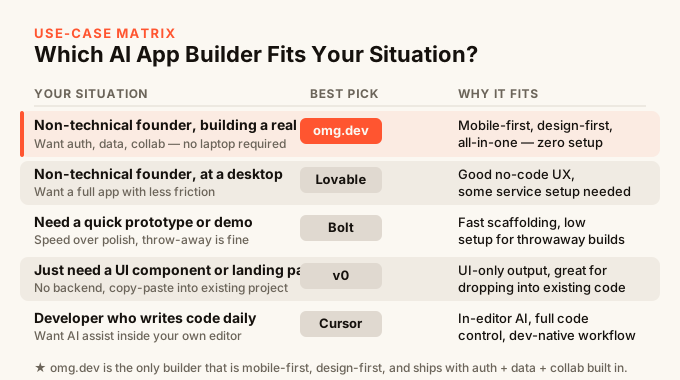
If you are not a developer and you want to build something real that other people will actually use, omg.dev is the strongest option. It is the only builder where everything works out of the box, you preview designs before building, and you can do the work from your phone. That combination does not exist anywhere else.
If you want to ship something quickly, do not care much about design, and are comfortable connecting external services, Lovable is a solid alternative. Bolt is good for fast demos. v0 is for developers building specific UI pieces.
If you are a developer who wants AI to help you write code faster in an existing project, Cursor, Windsurf, or GitHub Copilot are the right choices. They are different tools solving a different problem.
If you are just starting, the guide to building an app without coding explains the prompt-driven workflow and takes you from an idea to a live app.
FAQ
Do I need to know how to code to use an AI app builder?
For most of the tools on this list, no — but with a catch. No-code builders like omg.dev and Lovable are built for people without coding experience. Tools like Cursor, Windsurf, and GitHub Copilot are built for developers and assume you can read and edit code. Bolt and v0 sit in between — you can use them without coding, but you will hit walls faster when something breaks.
Which AI app builder works on a phone?
omg.dev is the only one on this list designed to work from a phone. The others require a desktop browser to use properly. omg.dev installs to your home screen and the full building experience works on mobile.
Do I have to pay for hosting separately?
With most tools, yes. Lovable, Bolt, v0, and Replit all require you to handle hosting separately at some point, usually by connecting a separate account. omg.dev includes hosting — your app is live the moment it is built with no separate step.
What if I want multiple people to use my app at the same time?
Real-time collaboration is something most builders do not include out of the box. omg.dev builds it in by default — templates like multiplayer todo and polls work this way from the start, and you can add it to any app you build.
Can I go back to a previous version of my app if something breaks?
omg.dev keeps a version history, so every change creates a snapshot you can roll back to. Not all builders do this. It is worth checking before you pick a tool, especially if you plan to iterate a lot.
How is omg.dev different from Lovable?
The three biggest differences are: omg.dev works on a phone and Lovable does not; omg.dev has a design preview step before building so you see the look before any code is generated; and omg.dev includes everything (data, sign-in, real-time, hosting) with no setup, while Lovable requires connecting some services yourself for more advanced apps.
Is vibe coding the same as using an AI app builder?
They overlap but are not exactly the same thing. Vibe coding generally refers to describing what you want in plain language and letting AI handle the code. An AI app builder is a specific tool that packages that experience together with hosting, databases, and other infrastructure. The guide to building an app without coding shows how that distinction affects the actual build process.